Edit Template

Deliverability 2024 for Email outreach

Many factors affect the delivery rate of letters to the INBOX folder for Cold Email mailings. This is related both to the setting of the mailbox and the domain, as well as to the features of writing letters.

One of the most important technical aspects is to prepare the domain from which Email outreach will be sent. There are settings like SPF, DKIM and DMARC for this.
Записи SPF та DKIM для доставляємості писем в розсилках

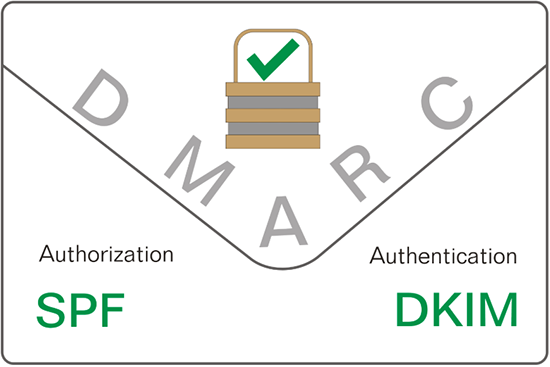
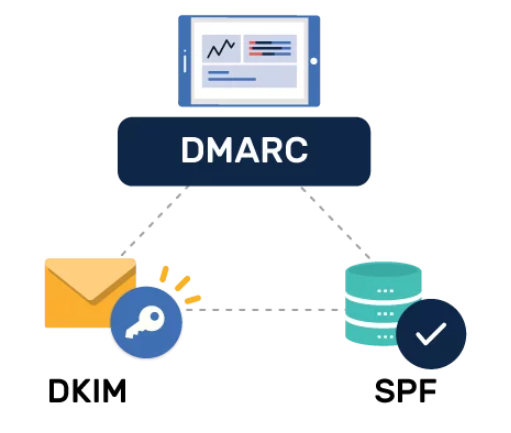
SPF, DKIM, and DMARC are a multi-layered approach to combating spam and fraud. To authenticate incoming emails, the receiving server must verify their authenticity, and this is done by comparing SPF, DKIM, and DMARC records.

SPF (Sender Policy Framework) defines a list of servers that can send mail on behalf of this domain and handle mail sent from other servers. By setting up an SPF record, you can significantly reduce the risk of spam being sent on behalf of your domain and improve inbox delivery.

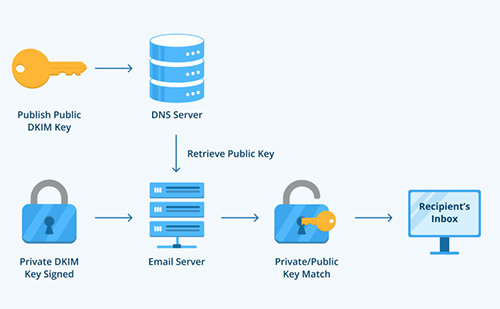
DKIM (DomainKeys Identified Mail) is the authentication of the sender’s domain using a generated digital signature. This method allows the recipient’s servers to verify that the email was actually sent from the specified domain and prevents the email text from being changed during delivery.

The DMARC protocol (Domain-based Message Authentication, Reporting, and Conformance) is configured after SPF and DKIM and allows protection against phishing attacks and e-mail fraud. DMARC provides the ability for domain owners to specify which mechanisms they use to authenticate their mail, and to send responses to explain why authentication failed to mail servers.

So, with the help of DMARC, the receiving server assigns authentication procedures and understands what to do with emails that do not pass the authentication check using SPF and DKIM, and also generates detailed reports on the authentication results.

All three protocols are necessary and important to minimize spam, improve brand reputation, and improve mail delivery. These three entries are configured individually and depend on the hosting, provider and domain registrar.
How to configure SPF, DKIM, DMARC records

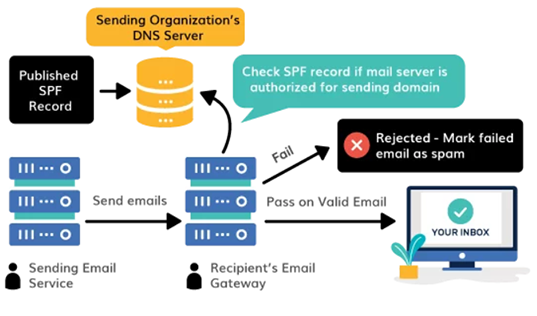
The SPF algorithm for email authentication works as follows:

1.The domain owner publishes an SPF record in the DNS of their domain.
2.The sent letter contains information about the sender’s domain.
3. The receiving server extracts this record from the received mail and looks up the DNS of the sender’s domain to obtain the SPF record.
4. The receiving server, after receiving the SPF, compares the IP address and hostname of the server that sent the message with the list of allowed servers specified in the SPF record.
5. As a result of the comparison, it is determined whether this email came from an authorized server or not.
6. Accept the letter in the inbox or sends it to SPAM in case of failure of verification.

Як працює налаштування SPF для Cold Emailing

The SPF record is configured as a TXT record in the DNS of the sender’s domain.

This can be done both through a domain registrar and with the help of a hosting provider. Enter the DNS management system, specify the host name ( @ – for the domain itself) and insert the SPF record in the value field.

Example of SPF:

v=spf1 include:_spf.ukraine.com.ua ~all

It is also possible to include in the domain record IP addresses from which mail can be sent both from your server and from the server of third-party providers.

“v=spf1 a mx ip4:137.249.32.2 ptr ip4:192.138.67.234 ptr: mail.magendas.com:mail.magendas.com ~all”

But SPF alone isn’t enough, and here’s why:

  1. SPF focuses only on authenticating the sending server and does not provide encryption protection or content control, unlike DKIM, which provides these features.
  2. In the case of SPF, it is not possible to uniquely identify the specific sender of an email, as SPF only verifies the authenticity of the sending server. Therefore, using SPF along with DMARC is extremely important.

For the most common ESPs, a simple SPF looks like this:

  • Google Workspace: v=spf1 include:_spf.google.com ~all
  • Microsoft 365: v=spf1 include:spf.protection.outlook.com -all
  • Zoho Mail: v=spf1 mx include:zoho.com ~all
  • Yahoo Mail: v=spf1 include:spf.protection.mail.yahoo.com -all
  • MailChimp: v=spf1 include:servers.mcsv.net ~all
  • Mailgun: v=spf1 include:mailgun.org ~all
  • Amazon SES: v=spf1 include:amazonses.com ~all
  • GoDaddy: v=spf1 include:secureserver.net –all
  • SendGrid: v=spf1 a include:sendgrid.net -all


It is convenient to use the validator for verification: mxtoolbox.com/SuperTool.aspx?action=spf

Протоколи аутентифікації пошти SPF, DKIM, DMARC

After configuring SPF, it is possible to switch to DKIM, it is necessary for:

• Minimization of domain forgery;

• Installation of a digital signature, which does not allow changing the contents of the letter;

• Reducing the amount of spam in e-mail;

• Increasing the reputation of the domain, and therefore increasing the delivery of letters.

How to configure this entry: Only the domain owner or the hosting account owner, if they own the domain, can enable DKIM, or they must delegate access.

It is necessary to create a TXT record in DNS, in which the main tags v=DKIM1 will be specified; k=rsa; s=email and added a digital signature text fragment.

Example:

v=DKIM1; k=rsa; p=MIGfMA0GCSqGSIb3DQEBAQUAA4GNADCBiQKBgQCrLHiExVd55zd/IQ/J/mRwSRMAocV/hMB3jXwaHH36d9NaVynQFYV8NaWi69c1v….

For example, for “Ukraine” hosting, the process of setting up a DKIM record can be more demanding and looks like this:

1. Go to the control panel of the owner of these NS.
2. In the domain settings, add a new entry with the following data: “Subdomain – Specify hosting._domainkey. “
3. Type of recording – select “TXT”. o Data – Paste the text of the record copied from the DKIM settings window (copy the text from “v=DKIM1; k=rsa; s=email;” to the end, including the ” character two lines below).

Аутентифікація при відправленні пошти

DKIM alone doesn’t stop spam or phishing attempts, it just makes it harder for bots to succeed because they first need access to your private keys before they can successfully spoof them.

Therefore, using DKIM together with DMARC is extremely important.

To connect the DMARC protocol, you need:

1. Create a TXT record in DNS using the console associated with the domain, or use the services of a DNS hosting provider that publishes it on your behalf.
2. Generate a DMARC record. This is possible with the help of free tools such as PowerDmarc.

The appearance of the record looks like this:

v=DMARC1; p=none; sp=none; rua=mailto: sergii@magendas.com; ruf=mailto:andrii@magendas.com; fo=1;

This is the simplest application option, because it is more effective to apply the policy of setting the incoming mail of your domain to quarantine, or even to rejection using such parameters.

p=none enforces zero enforcement and allows unauthorized emails that do not pass inspection to enter the recipient’s inbox unhindered.

p=quarantine ensures that emails that fail DMARC authentication are placed in the spam folder on the recipient’s email server, thereby placing them in quarantine.

p=reject removes or rejects unauthenticated unauthenticated emails before they are even delivered.

IP addresses and features of writing letters

In order for letters to get into the INBOX, the reputation of the sender’s IP is of great importance.

There is a division into dedicated IPs and public IPs.

The advantage of public IP is its constant warming due to a large number of receiving/sending from third-party users.

But there is also a downside – we cannot be sure of the reputation of other users and this IP may end up in the Gmail or Yahoo blacklist.

The dedicated IP also has a disadvantage – it is the need to constantly warm up with a large number of sending letters. If your company specializes in sending tens of thousands of letters per month, then the dedicated IP option is just for you.

The second important factor is the peculiarities of writing letters.

This includes spam words, about which we have a separate article.

And also recommended:

1. Avoid excessive amounts of punctuation marks, symbols and numbers.
2. Avoid using the written test in capslock;
3. Do not use a large number of links or unreasonably long URLs;
4. Do not use link exchange services, as this can also be taken as phishing;
5. Avoid using suspicious file attachments or archives with a very long name;
6. Minimize the number of applications and attach an application no larger than 1 MB;

Давайте можливість відписатись в один клік

In 2024, it is recommended to put the inscription Unsubscribe from the very top and in one of the most visible places.

Funny photo))) : 

This will allow the recipient to quickly unsubscribe from the mailing, on the other hand, the recipient may mark the letter as SPAM, or even worse, put it on the black list of senders.

And since the domain rating according to Gmail’s new requirements must be less than 0.1%, there can be only one spam link per 1,000 emails.

This rating should be followed very carefully.

Company

Marketing for B2B companies in the IT industry requires entirely different approaches than in other sectors, so a targeted focus is needed here for customer acquisition and retention.

Features

Most Recent Posts

Explore Our Capability

Download our brochure to learn more about Magendas capabilities

Category

Lead Generation B2B agency

Company

About Us

Contact Us

Products

Services

Blog

Features

Analytics

Engagement

Builder

Publisher

Help

Privacy Policy

Terms

Conditions

Privacy

Terms

Privacy Policy

Conditions